What Is a Meta Tag Analyzer?
A Meta Tag Analyzer is an SEO tool that examines the metadata contained in a webpage’s HTML and reports the information it finds. As a meta tag analysis tool and meta tag checker tool, it provides a quick way to review important metadata without manually inspecting a webpage’s HTML source.
An HTML Meta Tag Checker helps you inspect the SEO metadata contained in a webpage’s HTML. An SEO metadata analyzer can review elements such as the title tag, meta description, robots directives, canonical URL, and other important metadata.
Important elements commonly reviewed by a meta tag analyzer include the page title, meta description, robots meta tag, canonical URL, Open Graph information, and Twitter/X Card tags. These elements serve different purposes, but together they provide useful signals about a webpage.
A Meta Tag Analyzer is especially useful during website audits, content optimization, technical SEO checks, website migrations, and regular on-page SEO maintenance.
For a broader review of how your brand and important entities are represented online, try the Entity SEO Checker
Metadata is only one part of on-page optimization. Use our AI SEO audit checklist to review other important SEO elements and maintain a consistent optimization process across your website.
Why Are Meta Tags Important for SEO, GEO and AI SEO?
Meta tags help communicate important information about a webpage to search engines and other automated systems. They do not guarantee rankings, and not every meta tag is a direct ranking factor, but accurate metadata can support better crawling, indexing, page understanding, and search-result presentation.
For traditional SEO, a unique title and useful meta description can help describe the page and influence how users interact with its search result. A free SEO meta tag checker can help identify missing, duplicate, or incorrectly configured metadata that may affect how search engines understand and display your pages. A meta tag analyzer for SEO provides another way to review these metadata elements and identify potential optimization issues.
For GEO and AI SEO, clear metadata can provide additional context around a page’s subject, purpose, and preferred URL. AI-powered search and answer systems use multiple sources and signals to understand content, so metadata should work together with high-quality visible content, headings, structured data, internal links, and strong topical relevance.You can also use the AI Search Readiness Checker to evaluate whether your website is prepared for AI-powered search and answer systems.
Learn how Generative Engine Optimization shapes modern search strategies
For LLMO, consistency matters. When your title, description, canonical URL, headings, and actual page content communicate the same topic clearly, automated systems have a cleaner set of signals from which to interpret the page.
Understand how LLMO helps brands improve AI search visibility.
To understand how different website signals work together during an SEO review, explore our AI SEO audit methodology and learn about the broader process of identifying website optimization issues.
How Does the Free Meta Tag Analyzer Online Work?
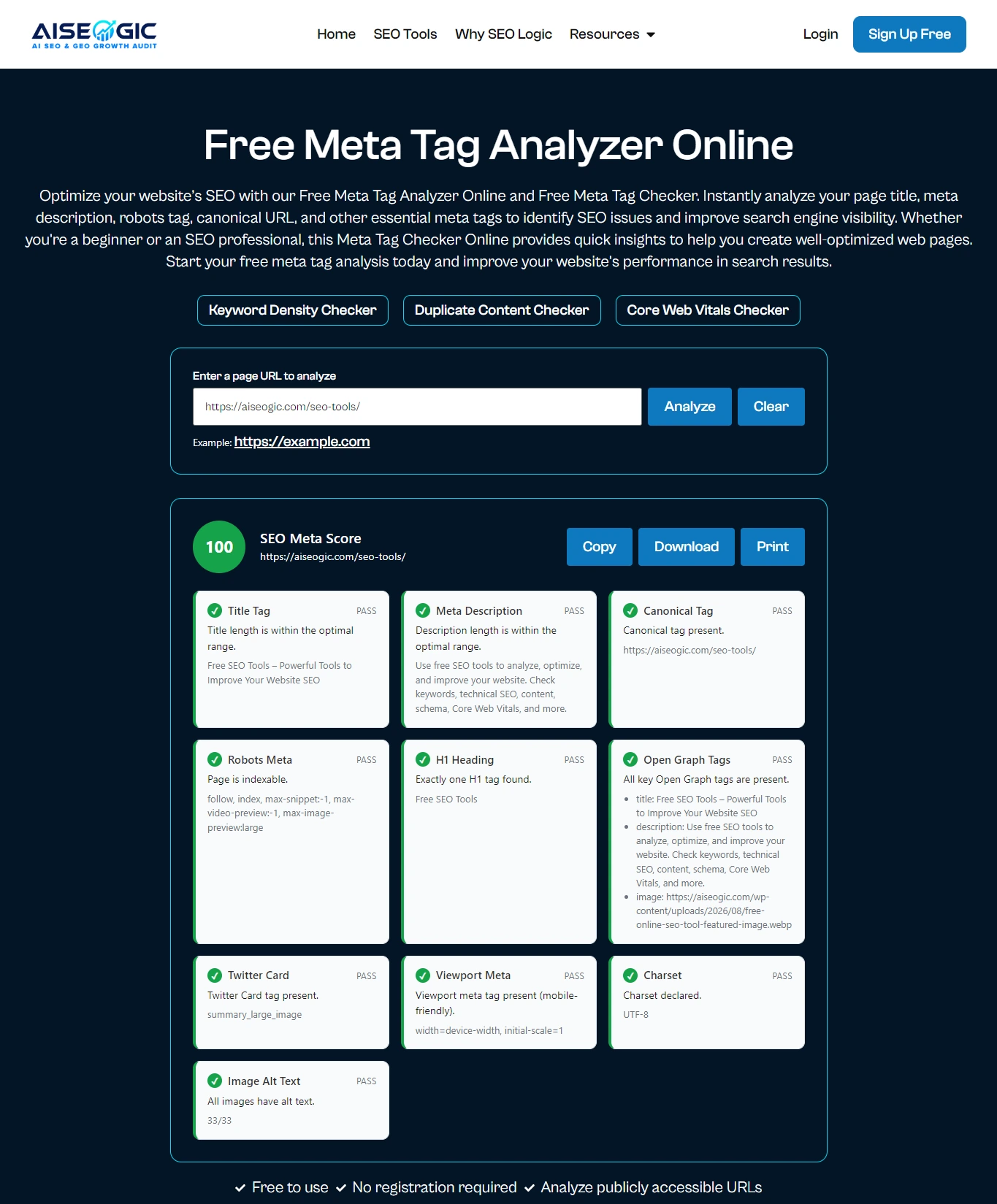
The Free Meta Tag Analyzer Online is an online meta tag analyzer that works as a free meta tag analyzer tool and meta tag analysis tool online, retrieving a publicly accessible webpage and examining the metadata available in its HTML.
The basic process is:
- Enter the full webpage URL into the analyzer.
- Start the analysis.
- The tool scans the accessible page metadata.
- It identifies important SEO and social meta elements.
- The results show the metadata found on the page.
- Review missing, duplicated, or potentially problematic elements.
- Update your website and analyze the page again.
This process saves time compared with opening the source code and searching manually for individual meta elements.
Along with reviewing your page metadata, use the Freshness Signal Checker to examine date-related signals that may help communicate when content was published or updated.
What Does the Meta Tag Analyzer Check?
The analyzer works as a meta tags checker and webpage meta tag checker, helping you check SEO meta tags that can influence how your webpage is understood and presented.
Title Tag
A title tag checker helps you review the title tag of a webpage. The title tag identifies the main subject of a webpage and is one of the most important on-page SEO elements, commonly contributing to the title shown in search results.
A good title should be unique, descriptive, relevant to the page, and written primarily for users. Avoid stuffing the title with repeated keywords.
Meta Description
A meta description checker helps you review the meta description of a webpage. The meta description provides a concise summary of the page. Search engines may use it when generating search snippets, although they can also select other text from the page.
According to Google Search Central, Google may use a page’s meta description when it provides a more accurate search-result snippet than the page content itself.
A useful description should accurately explain what users will find on the page and naturally communicate the primary topic or benefit.
Robots Meta Tag
A robots meta tag checker helps you review the robots meta tag and identify directives that may affect how search engines handle a page. The robots meta tag can provide instructions concerning how search engines should handle a page. Incorrect directives can create technical SEO problems, particularly when an important page is unintentionally restricted from indexing.
Always check robots directives carefully before changing them.
According to Google Search Central, the robots meta tag provides page-level instructions that can control how Google indexes and serves a page in search results.
Canonical URL
A canonical tag checker helps you review the canonical tag and verify that the preferred URL is correctly configured. The canonical tag indicates the preferred URL for a page when multiple URLs contain similar or duplicate content.
Checking the canonical URL helps identify situations where a page points to an unexpected URL, has no canonical when one is appropriate, or contains inconsistent canonical information.
Google Search Central explains that canonicalization helps Google select the representative URL when multiple URLs contain duplicate or very similar content.
Open Graph Tags
An Open Graph checker and Open Graph meta tag checker help you review Open Graph metadata and verify that important information is configured correctly when a webpage is shared across compatible social platforms.
Common Open Graph elements include the page title, description, URL, and preview image. Accurate social metadata can make shared links clearer and more recognizable.
Twitter/X Card Metadata
A Twitter Card checker helps you review Twitter/X Card tags and verify the information used for link previews on X and compatible systems. Twitter/X Card tags provide additional information for link previews on X and compatible systems.
Checking these tags helps ensure that your page has appropriate information for social sharing and that the preview represents the intended content.
What Is the Difference Between a Meta Tag Analyzer and a Meta Tag Checker?
A Meta Tag Analyzer and a Meta Tag Checker generally refer to tools that examine the metadata of a webpage. The terms are often used interchangeably, although an analyzer may provide more detailed information about the metadata it finds and potential optimization issues.
A meta tag checker typically focuses on verifying whether specific metadata, such as a title tag, meta description, robots directive, or canonical URL, is present and correctly configured. A meta tag analyzer can go further by presenting the collected metadata in a broader report that helps users review and optimize their page.
AISEOgic’s Free Meta Tag Analyzer Online combines these functions by helping you inspect important SEO and social metadata from a publicly accessible webpage and understand potential issues that may require attention.
How to Use the Free Meta Tag Analyzer Online
Using the tool requires only a few simple steps.Step 1: Choose a Public Page
Select the webpage you want to analyze. Use the complete URL of the page rather than only the domain name.Step 2: Enter the URL
Paste the URL into the Free Meta Tag Analyzer Online tool, a free meta tag checker online tool that also works as an SEO meta tag checker online for reviewing your page metadata.Step 3: Start the Analysis
Click the analyze button to begin checking the webpage metadata with our Meta Tag Checker Online.Step 4: Review the Results
Examine the SEO report for the title, meta description, robots directives, canonical URL, Open Graph tags, Twitter/X metadata, and other available information.Step 5: Identify Issues
Look for missing metadata, duplicate information, unexpected URLs, incorrect directives, or inconsistencies between metadata and the actual page content.Step 6: Make the Changes
Update your website’s HTML, CMS fields, SEO plugin settings, or templates based on the findings.Step 7: Analyze Again
Run the page through the analyzer again to analyze website meta tags after making changes and confirm that the metadata is now correct.Review your title tags and meta descriptions to make sure they accurately represent each page and encourage relevant clicks. For a broader look at AISEOgic’s website auditing features, read its free AI SEO audit platform announcement, and explore more SEO guidance on the AISEOgic YouTube channel.
How to Understand Your Meta Tag Analyzer Results
The results from this SEO Meta Tag Analyzer Tool provide a detailed Meta Tag Analysis and SEO meta tag analysis, making it easy to perform meta tag analysis online and review your metadata as an optimization checklist rather than a simple pass-or-fail SEO score. An SEO meta tag analyzer can help you identify metadata issues that require attention and prioritize improvements based on the purpose of each page.
If the title is missing, add a unique title that clearly describes the page.
If the title is duplicated, create a page-specific title that reflects the individual content and search intent.
If the meta description is missing, use a missing meta description checker to identify the issue, then write a concise and useful description that accurately summarizes the page.
If the meta description is duplicated, create unique descriptions for important pages instead of using the same text across the website.
If the robots directive looks incorrect, verify the intended indexing and crawling behavior before changing it.
If the canonical URL is missing or incorrect, check whether the page should have a canonical URL and make sure the preferred URL is accurate.
If Open Graph or Twitter/X metadata is missing, add appropriate social metadata when social sharing is important for your website.
Important: A meta tag analysis is one part of an overall SEO review. A page can have correctly configured metadata and still have issues with content quality, technical SEO, performance, backlinks, indexing, or search intent. Use the results as a practical checklist rather than as a guarantee of search rankings.
When you need to review metadata across multiple URLs instead of checking pages individually, use the bulk website metadata checker to identify title and meta description issues across a larger set of pages.
How to Fix Meta Tag Problems
Fixing metadata starts with matching each element to the actual purpose of the page.
Create a unique title for every important indexable page. Write descriptions that summarize the page naturally instead of creating keyword-heavy text. Use the primary topic where it fits naturally, but avoid repetitive keyword insertion.
Check that canonical URLs use the correct preferred page URL and that they are consistent with your site’s URL structure. Review robots directives carefully because an accidental noindex instruction can prevent an otherwise valuable page from appearing in search results.
For social metadata, make sure the Open Graph and Twitter/X information accurately represents the page. Use relevant titles, descriptions, URLs, and images rather than generic site-wide information when page-specific metadata is available.
If your website runs on WordPress, the WordPress SEO Audit Fixer Plugin can help you review and address supported SEO issues through a structured website optimization workflow.
Most importantly, make sure your metadata agrees with the visible content. A title that promises one topic while the page discusses another creates a poor experience for users and automated systems.
How Often Should You Check Meta Tags?
Run a meta tag check whenever important website changes are made, including redesigns, migrations, CMS changes, template updates, new content launches, or changes to SEO settings.
For larger websites, regular technical SEO audits can help identify metadata problems introduced by templates or automated systems.
An online meta tag checker is useful for quickly reviewing individual URLs, while a meta tag checker for website can help you inspect important metadata without manually inspecting the HTML source. A free website meta tag checker can also be used for quick checks without requiring paid SEO software.
Along with checking individual metadata elements, run a free SEO audit to identify other technical and on-page SEO opportunities across your website.
Final Checklist for Better Metadata
Before publishing or optimizing a webpage, make sure it has a unique and relevant title, an accurate meta description, appropriate robots directives, a correct canonical URL where needed, and useful social metadata.
Also check that the metadata matches the page’s actual content and search intent. Avoid duplicate information across important pages and do not rely on metadata alone to improve rankings or AI visibility.
A regular Free Meta Tag Analyzer Online check can help you maintain cleaner on-page SEO, identify technical metadata issues, improve search-result presentation, and keep your website’s information consistent for search engines, users, social platforms, and modern AI-powered discovery systems. This meta tag analyzer tool can also be useful when reviewing important pages after website updates, redesigns, migrations, or SEO changes.
Metadata reviews should also consider whether published and updated dates accurately reflect your content. Use the content freshness signal checker to examine date-related signals that may help communicate content freshness.
About AISEOgic’s Meta Tag Analyzer
The Free Meta Tag Analyzer Online is provided by AISEOgic, an SEO and AI search optimization platform that helps website owners, marketers, and SEO professionals identify technical SEO and search visibility issues. AISEOgic develops practical website audit and SEO tools designed to make technical optimization easier to understand and apply.
Learn more about the platform’s launch and its approach to website optimization in the AISEOgic free AI SEO and GEO audit platform announcement.
FAQ
1. What is a Meta Tag Analyzer?
A Meta Tag Analyzer is an SEO tool that scans a webpage’s metadata, including the title tag, meta description, canonical URL, robots directives, and social meta tags. It helps identify missing or improperly configured tags that can affect search visibility.
2. Is this Meta Tag Analyzer free to use?
Yes, our Meta Tag Analyzer is completely free to use. Simply enter your webpage URL, and the tool instantly analyzes your metadata and provides recommendations without requiring registration or installation.
3. What meta tags does this tool check?
The tool analyzes important SEO tags such as the page title, meta description, canonical tag, robots meta tag, Open Graph tags, Twitter Card tags, and other essential metadata that influence search engine indexing and social sharing.
4. Why are meta tags important for SEO?
Meta tags help search engines understand the purpose and content of your webpage. Well-optimized meta tags can improve click-through rates, enhance search visibility, and generate better previews when your content is shared on social media.
5. Can I analyze any website URL?
Yes. You can analyze any publicly accessible webpage by entering its URL into the tool. The analyzer retrieves the page metadata and generates a detailed SEO report highlighting issues and optimization opportunities.
6. Can a Meta Tag Analyzer check pages that are not indexed by Google?
Yes. A Meta Tag Analyzer can generally inspect a publicly accessible webpage even if the page is not currently indexed by Google. However, the page must be accessible to the analyzer and not blocked by authentication, network restrictions, or other access controls. Being able to analyze a page does not mean that Google will index it.
- Publish Date: